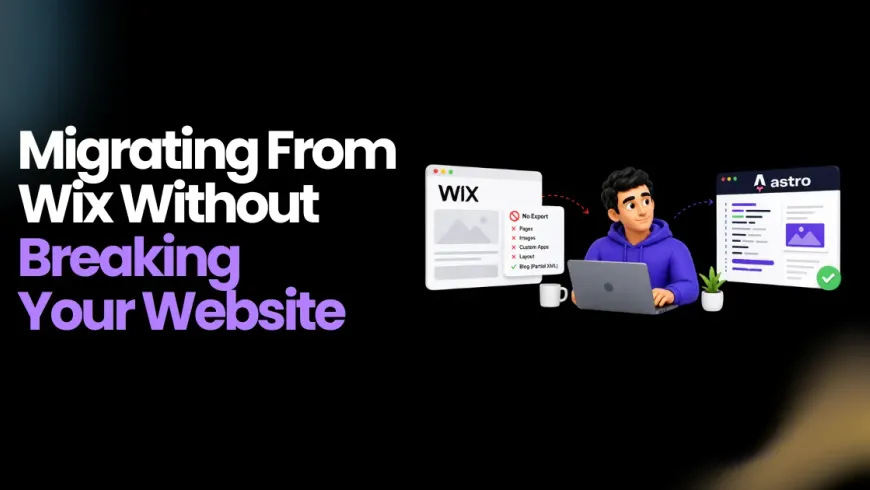
Migrating a Wix site to Astro is unlike any other platform migration. With WordPress, you export a database. With Webflow, you export a CSV. With Wix, there is no export. Not for pages, not for images, not for custom apps, not for your layout. The only thing Wix lets you take is a partial XML file of blog posts, and even that excludes images. Everything else — the content you wrote, the design you built, the SEO you accumulated — lives inside Wix’s proprietary system with no official exit route.
That reality shapes every decision in a Wix migration to Astro. This guide explains how to migrate Wix site to Astro, how the process actually works, what to plan for before you start, the step-by-step workflow that migration specialists use, and the mistakes that cost teams the most time and search equity. Whether you are managing this yourself or working with an agency, this is the complete reference for migrating a Wix site to Astro.
Things to Keep in Mind When Migrating a Wix Site to Astro
This Is a Rebuild, Not a Migration in the Traditional Sense
Most platform migrations involve exporting structured data and importing it somewhere new. A Wix migration to astro is different. Because Wix provides no structured content export, the primary source for page content is the live published site itself. Content is extracted by crawling the rendered HTML. Design is rebuilt from screenshots and visual reference. The migration is closer to a site rebuild with content extraction than a traditional database migration.
Understanding this upfront sets realistic expectations for timeline and effort.
Wix’s HTML Is Deliberately Obfuscated
When you crawl a Wix site, the HTML you receive is not clean, semantic markup. Class names are hashed strings like _2gMbR. The page structure is deeply nested divs with no semantic meaning. There are no heading hierarchies, no identifiable article or section elements, and no structured content containers. The content itself is there, but extracting it requires parsing through layers of Wix’s JavaScript-rendered output. This is why AI coding agents or dedicated crawling tools are the practical approach for most migrating Wix sites to Astro projects.
Three Wix Site Types Have Different Levels of Difficulty
Wix has three distinct editing environments: Wix ADI (AI-built sites), Wix Editor (the classic editor), and Wix Studio (the newer professional editor). ADI sites tend to have the most predictable structure. Classic Editor sites vary widely depending on how the builder customized them. Wix Studio sites add another layer of complexity. Knowing which type you are migrating from affects how much manual cleanup the extracted content will need.
Wix App Data Cannot Be Bulk Exported
Wix Stores product catalogs, Wix Bookings reservation data, and Wix Members user records cannot be exported in bulk. This data is locked inside Wix’s system. If your site runs e-commerce, bookings, or a membership area, plan from the start that this data will need to be manually recreated in replacement services, or exported piece by piece via the Wix Velo API (Premium plan required, and API coverage is incomplete).
Wix Image URLs Are Not Permanent
Images on a published Wix site are served from Wix’s CDN with URLs that can change. Do not hot-link Wix image URLs in your new Astro site. Download every image during the migration and host them from your own CDN or static asset folder. BrowserCat’s Wix migration guide flags this explicitly as a gotcha that causes broken images weeks after a migration appears to be complete.
Step-by-Step Guide to How to Migrate Wix Site to Astro
Step 1: Audit What Wix Gives You
Start by collecting everything Wix will actually let you export before crawling the live site.
Wix Blog XML export. Go to Dashboard → Blog → Settings → Export. This produces an XML file with post titles, content, dates, and categories. It does not include images, pages, or any other content type. It is limited but better than nothing for blog-heavy sites.
Wix sitemap. Your Wix sitemap is available at yoursite.com/sitemap.xml. Download and save it. This becomes your complete URL inventory and your redirect planning document.
Velo API (Premium plan only). If you are on a Wix Premium plan with Velo enabled, you can access some content programmatically: blog posts, store products, and form submissions. Coverage is incomplete, but it is a cleaner data source than scraping HTML for the content it does cover.
Also note your current site analytics. Identify the top 30 pages by organic traffic in Google Search Console. These pages require the most careful redirect handling.
Compare leading Astro development and migration partners.
Step 2: Extract Content from the Published Site
Since Wix provides no meaningful site export, the published site is the primary content source. There are three practical approaches to how to migrate Wix site to astro, ordered from most automated to most manual.
AI coding agent crawling (recommended). Tools like Claude Code, Cursor, Windsurf, and Cline can crawl your published Wix site, parse the obfuscated HTML to extract text content, headings, images, and metadata, and scaffold a complete Astro project. The agent creates a page file for each page, organizes blog posts into a content collection as Markdown files with frontmatter, and downloads all discoverable images. Set up an Astro project first with npm create astro@latest, then direct the agent at your Wix URL. This is the approach used in the ZenML case study and by most teams doing how to migrate Wix site to astro at scale.
BrowserCat Migrate. A dedicated automated tool that crawls the published Wix site using a real browser, extracts all content and images, and produces a deployable Astro project with a GitHub repository. Useful for teams without AI coding tool access.
Manual extraction. Screenshot each page, copy text content into Markdown files, and download images individually. Practical only for sites under 10 pages. For anything larger, manual extraction is not a realistic approach given Wix’s HTML structure.
After extraction, download every image referenced on the site. Reorganize them into a flat structure under public/images/ in your Astro project. Do this before the Wix subscription ends.
Step 3: Scaffold the Astro Project
Initialize the project and add the integrations needed for a typical business site:
npm create astro@latest
npx astro add mdx sitemap tailwind
For blog content, define a Content Collection schema. Each extracted blog post becomes a Markdown file with YAML frontmatter:
Step 4: Rebuild the Design in Astro
Do not try to convert Wix’s CSS. The hashed class names and nested div structure have no usable mapping to standard CSS. Rebuild the visual design from scratch using your screenshots and live site as reference. Tailwind CSS is the default choice for Wix migration to astro rebuilds because its utility classes make it fast to replicate a visual design without writing a custom CSS architecture.
Most teams treat the migration as an opportunity to refresh the design rather than replicate it pixel-for-pixel. The original Wix design was likely constrained by what the editor allowed. Astro gives you full control over markup and styling.
Step 5: Replace Wix-Native Features
Each Wix app needs a replacement service that connects to Astro. Here is the standard replacement map:
| Wix feature | Astro replacement |
|---|---|
| Wix Blog | Astro Content Collection (Markdown/MDX files in Git) |
| Wix Stores | Snipcart, Shopify Buy Button, or Stripe Checkout |
| Wix Bookings | Cal.com, Calendly, or Acuity Scheduling |
| Wix Forms | Formspree, Web3Forms, or Astro Actions |
| Wix Members | Auth0, Clerk, or Supabase Auth |
| Wix Image galleries | HTML/CSS gallery or a JavaScript lightbox island |
| Wix Contact Maps | Google Maps or Mapbox embed |
| Wix Analytics | Plausible, Fathom, or Google Analytics |
| Wix Search | Pagefind (static, free) |
For Wix Stores specifically: your product catalog cannot be bulk exported. You will need to manually recreate products in Shopify, Snipcart, or your chosen replacement, or use the Velo API to script a one-product-at-a-time extraction if you have Premium plan access.
Step 6: Build the SEO Layer
Export your Wix sitemap (yoursite.com/sitemap.xml) and use it to create your 301 redirect map. Where URLs can be preserved exactly, preserve them. Where they must change, configure a 301 redirect for every URL in the public/_redirects file.
Add @astrojs/sitemap to generate a new sitemap automatically from your Astro pages. Set meta titles and descriptions in each page’s frontmatter. Structured data can be written directly into .astro files as standard JSON-LD script tags without any plugin.
This is where migrating Wix site to astro requires the most careful manual attention: Wix’s SEO metadata does not export. Title tags and meta descriptions need to be manually reviewed and added to each page’s frontmatter during the rebuild.
Step 7: Transfer Your Domain
If your domain is registered through Wix, transfer it to an independent registrar before cutover. Cloudflare Registrar, Namecheap, and Porkbun are common choices. The transfer process requires unlocking the domain in the Wix Dashboard and obtaining an authorization code. Transfers typically take one to five business days. Plan this into your migration timeline so you are not waiting on a domain transfer at the moment you want to go live.
If your domain is registered elsewhere and only pointing to Wix via DNS, this step is simpler: just update the A or CNAME record to point to your new host.
Step 8: Deploy to Staging and Validate
Deploy your Astro build to a preview URL on Cloudflare Pages, Netlify, or Vercel before touching DNS. Walk through the following:
-
Verify every page renders with correct content and layout
-
Test every 301 redirect with curl -I to confirm 301 status codes
-
Check all images load from your new hosting (not from Wix’s CDN)
-
Verify forms submit correctly to replacement services
-
Run Lighthouse on five representative pages and confirm scores
Step 9: DNS Cutover and Post-Launch
Lower DNS TTL to 300 seconds at least 24 hours before cutover. Switch DNS records to the new host. Submit the new sitemap to Google Search Console on launch day. Monitor Search Console daily for crawl errors and coverage drops for the first two weeks.
Keep the Wix site accessible until DNS has fully propagated and the new site is confirmed stable. Do not cancel the Wix subscription immediately — keep it active for at least 30 days after cutover as a fallback reference.
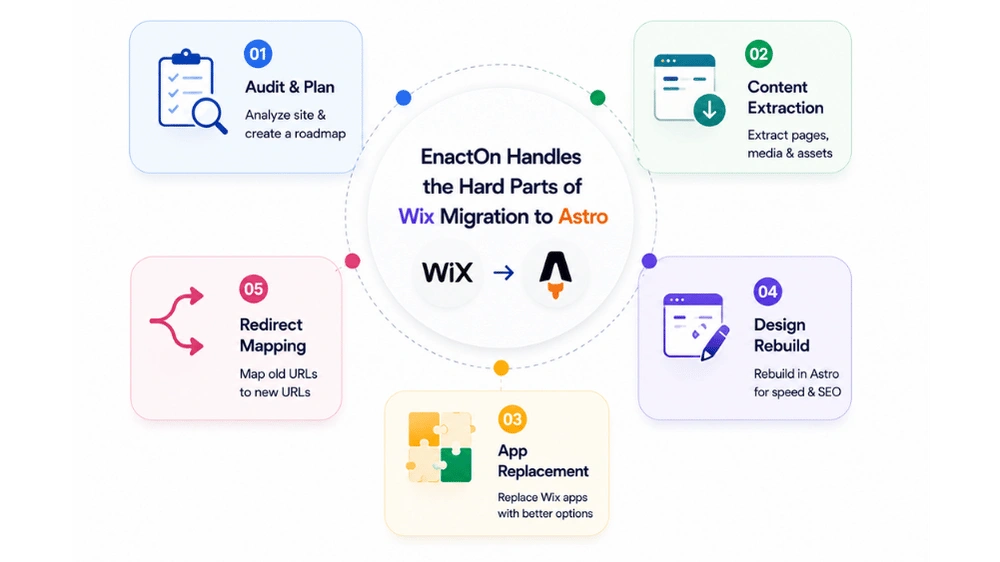
EnactOn Handles the Hard Parts of Wix Migration to Astro
The content extraction, design rebuild, app replacement, and redirect mapping that go into a successful Wix migration to astro are each their own technical workstream. Missing one — particularly redirect configuration or image downloading — creates problems that show up days or weeks after launch. Enacton has a structured process for how to migrate Wix site to astro that covers each step from audit to post-launch monitoring.
Mistakes to Avoid When Migrating from Wix to Astro
1. Hot-Linking Wix Image URLs
This is the most commonly reported post-migration issue in Wix to Astro migrations. Wix CDN image URLs are not permanent. They can change without notice. Any Astro page that references a Wix image URL rather than a locally hosted copy will show broken images after those URLs change. Download every image during the migration and host them from your own project or CDN.
2. Canceling the Wix Subscription Before the Migration Is Complete
Once the Wix subscription lapses, the site goes offline. If your content extraction is incomplete, your image downloads are partial, or you need to check a page reference, you have lost access. Keep the subscription active until the new site is fully live, verified, and stable.
3. Skipping the Wix Blog XML Export
Even though the XML export is incomplete (no images, no pages), it is the cleanest structured data Wix provides for blog content. Extracting it before starting saves manual cleanup of crawled blog HTML. Do this before anything else.
4. Trying to Convert Wix CSS
Wix’s exported class names (_2gMbR, _1Cz4U) have no relationship to your design intent. Attempting to map them to new CSS rules produces an unmaintainable stylesheet. Rebuild styling from scratch using Tailwind or custom CSS based on the live site’s visual appearance.
5. Assuming Wix Stores Data Can Be Migrated Automatically
There is no bulk export path for Wix Stores. Product catalog data, order history, and customer records are locked in Wix’s system. Teams that discover this mid-migration add significant unplanned time to the project. Identify the scope of Wix Stores data early and budget explicitly for manual recreation or API-based extraction.
6. Not Capturing SEO Metadata Before Rebuilding
Wix stores page titles and meta descriptions in its backend. They are not visible in the page source and are not accessible via any export. During the crawl phase, save the rendered page source for each page and extract <title> and <meta name=“description”> values before rebuilding. These need to go into each page’s frontmatter in your Astro project.
7. Going Live Before Verifying All Redirects
A Wix migration to astro changes every URL’s hosting environment. Even if URL paths are preserved, missing redirects for old Wix-generated URLs — like blog category pages or pagination URLs — will return 404s. Test every redirect before DNS cutover using an automated redirect checker or curl -I on each URL in your sitemap export.
Conclusion
The Wix migration to the Astro process is more demanding than migrations from platforms that provide structured exports. Wix’s vendor lock-in is documented, intentional, and the most aggressive of any major website platform. There is no shortcut around the fact that the site needs to be rebuilt rather than ported.
But the outcome on the other side makes the effort worthwhile. Astro sites on Cloudflare Pages load in under one second from a CDN edge. Lighthouse scores that Wix sites struggle to reach above 70 become the baseline at 95 to 100. Monthly platform fees between $17 and $159 drop to zero in hosting costs. And the resulting codebase is fully owned, version-controlled, and compatible with AI coding tools that can maintain and expand it without Wix’s editor getting in the way.
Still deciding if this is the right move? See the full Astro vs Wix comparison for the complete picture.
The trigger for most migrating Wix site to astro projects is the realization that two years of Wix fees would cover the cost of a migration that permanently eliminates those fees. Once that math becomes clear, the decision is straightforward.
EnactOn’s Astro migration service handles the full Wix migration to astro process, from content extraction and design rebuild to app replacement, redirect configuration, domain transfer, and post-launch monitoring. If your Wix site has outgrown the platform, the team will tell you exactly what the migration looks like and what it costs.
Ready to move to Astro? Speak with our migration experts.
FAQs
Is there a way to export a Wix site before migrating to Astro?
Not fully. Wix provides a partial XML export for blog posts only (Dashboard → Blog → Settings → Export), but it excludes images, pages, and all other content. Pages, design, and app data have no export path. The standard approach for migrating Wix site to astro is to crawl the published site for content and images, then rebuild the design from screenshots.
How do I get my images out of Wix during migration?
During the crawl phase, your AI agent or crawling tool should identify and download every image referenced on each page. Images are served from Wix’s CDN with URLs that are not permanent, so they must be downloaded to local storage and re-hosted in your Astro project’s public/images/ directory during the migration.
What happens to Wix Stores during a Wix migration to astro?
Wix Stores product data cannot be bulk exported. Products need to be manually recreated in a replacement platform: Snipcart or Shopify Buy Button for overlay-style carts, or a full headless Shopify backend for more complex catalogs. The Velo API can export products one at a time on a Premium plan, but it requires scripting and is not a complete solution for large catalogs.
How long does a Wix migration to astro take?
Published estimates vary by site complexity. Araptus, a migration agency, cites four to eight weeks as a typical project timeline for a full Wix-to-Astro migration including content team training. Small sites with limited pages and no Wix apps can be migrated faster, particularly with AI coding agent assistance. Sites with large Wix Stores catalogs take longer due to the manual product recreation required. To understand realistic budget tiers for developer and agency assistance, consult our guide on how much Astro development costs.
Will my SEO rankings be affected by migrating Wix site to astro?
Managed correctly, the migration improves rankings over time. Astro sites consistently score higher on Core Web Vitals than Wix sites, and Google uses Core Web Vitals as a ranking factor. The critical tasks are: preserving URL structure where possible, setting up 301 redirects for any URLs that change, migrating all meta titles and descriptions to Astro frontmatter, submitting the new sitemap to Google Search Console on launch day, and monitoring for crawl errors in the first two weeks. For a comparative view of performance and SEO architecture, check our Astro vs Wix analysis.
Can I keep using Wix for content management after migrating to Astro?
Yes, through Wix’s headless API. With a Wix Premium plan and the Velo API, Astro can fetch content from Wix’s CMS at build time, keeping editors in the Wix interface while the frontend runs on Astro. This is the approach used in Wix’s own managed headless product, which generates Astro projects by default. The trade-off is ongoing Wix subscription costs and incomplete API coverage for all content types.