If you have been looking at Astro as the framework for your next website, chances are you already know it is fast. What you probably want to know now is what it will cost you. Whether you are starting from scratch after understanding what Astro is or thinking about migrating an existing site, the numbers can vary quite a bit depending on who you hire, how complex your project is, and what you need long-term. This article breaks it all down clearly so you can go into conversations with agencies and freelancers with realistic expectations.
What Actually Goes Into Astro Development Cost?
Before jumping into numbers, it helps to understand what you are actually paying for when you commission an Astro project. Unlike Wix or Webflow, Astro is not a hosted platform with a monthly subscription baked in. It is an open-source framework, so the framework itself is free. What you pay for is the time and expertise of whoever builds and configures it for you.
That cost is shaped by a few key factors:
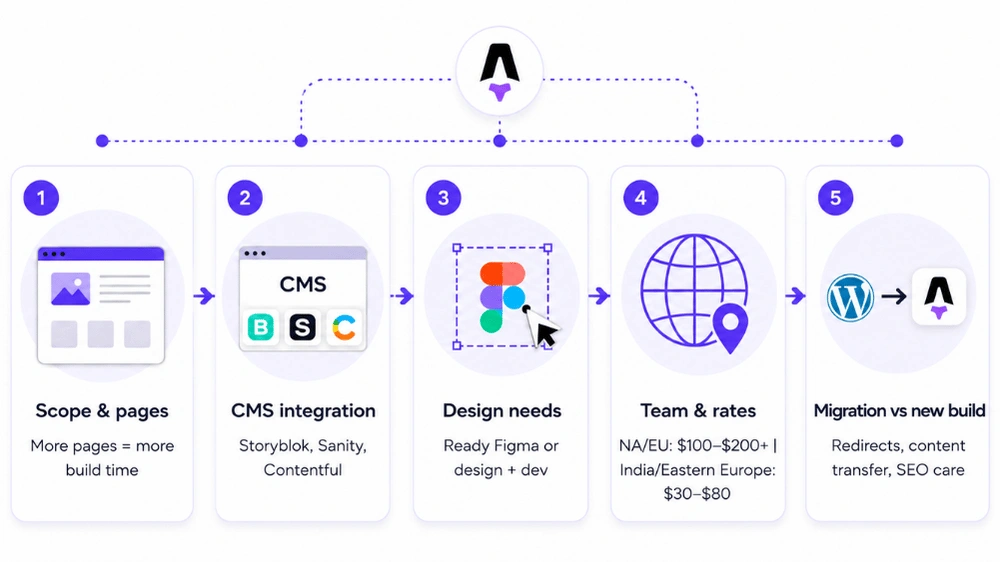
Scope and number of pages
A 10-page marketing site and a 200-page documentation platform are both great use cases for Astro, but they are very different builds. More pages, more components, more complex routing all push the cost up.
CMS integration
Most Astro projects are paired with a headless CMS like Storyblok, Sanity, or Contentful so that non-developers can manage content after launch. Connecting and configuring a CMS adds meaningful development time.
Design requirements
If you are bringing a finished Figma design, the developer just needs to build it. If you need design work done alongside development, expect that to be a separate line item or a higher overall quote.
Team location and experience
An agency in North America or Western Europe typically charges $100 to $200+ per hour. Developers in India or Eastern Europe with equivalent Astro expertise often come in at $30 to $80 per hour. The deliverable can be the same quality; the rate depends on geography and experience level.
Migrations vs. new builds
If you are moving from WordPress, Webflow, or another platform, the job is different from a greenfield build. You are paying for content migration, URL mapping, redirect setup, and making sure SEO rankings do not take a hit during the switch.
Astro Development Cost: Building from Scratch
Here is what realistic budgets look like for new Astro builds across different project types.
| Project Type | Scope | Estimated Cost | Timeline |
|---|---|---|---|
| Simple static site / personal site | 5-10 pages, no CMS, minimal design | $1,500 - $5,000 | 1-2 weeks |
| Small business marketing site | 10-20 pages, basic CMS, standard design | $5,000 - $15,000 | 2-4 weeks |
| Startup / SaaS marketing site | 20-40 pages, headless CMS, custom design, animations | $15,000 - $35,000 | 4-8 weeks |
| Mid-market corporate site | 40-80 pages, CMS, multilingual, design system | $35,000 - $65,000 | 8-12 weeks |
| Large enterprise / documentation platform | 100+ pages, advanced integrations, AI features | $65,000 - $120,000+ | 12-20 weeks |
A straightforward Astro marketing site with a headless CMS typically lands in the $20,000 to $40,000 range when worked on by a US-based Astro agency. Add CMS complexity, multilingual support, custom animations, or AI integrations and you are looking at $40,000 to $60,000 or more. Freelancers in markets like India can deliver comparable quality builds for significantly less, often 40 to 60% below US agency rates.
EnactOn’s Astro Development Service is built for teams starting from scratch. Whether you need a lean startup marketing site, a documentation platform, or a full enterprise web presence, we design and build Astro sites that are fast out of the box, easy for your team to manage, and built to scale as your business grows. We handle everything from Figma to deployment, including CMS setup, SEO configuration, and performance tuning.
Astro Development Cost: Migrating from Another Platform
Migrations are a different animal. You are not starting from zero conceptually, but you are rebuilding the entire technical stack, moving content, and making sure nothing breaks in the process. The stakes are higher because a botched migration can tank your organic search rankings overnight.
| Migration Type | Complexity | Estimated Cost | What’s Included |
|---|---|---|---|
| Webflow to Astro (small site, under 30 pages) | Low | $5,000 - $15,000 | Page rebuild, CMS setup, redirects, SEO preservation |
| WordPress to Astro (blog / content site) | Medium | $12,000 - $30,000 | Content migration, URL mapping, redirects, CMS integration |
| WordPress to Astro (large site, 100+ pages) | High | $30,000 - $70,000 | Full content migration, design rebuild, advanced SEO handling |
| Webflow to Astro (complex, animations, CMS) | High | $20,000 - $50,000 | 1:1 rebuild, animation parity, CMS reconfiguration |
| Wix to Astro | Medium | $6,000 - $18,000 | Asset extraction from closed builder, clean CSS rebuild, SEO parity |
| Custom CMS / legacy platform to Astro | Very High | $50,000 - $100,000+ | Data extraction, custom integrations, full rebuild |
One thing worth noting: a serious Astro migration agency should guarantee zero SEO loss and zero downtime on migrations as standard, not as a premium add-on. When you are vetting someone for a migration, ask specifically how they handle redirects, canonical tags, and Core Web Vitals before and after go-live. EnactOn’s Astro Migration Service builds all three into every engagement by default. That question alone will tell you a lot about who you’re hiring.
EnactOn’s Astro Migration Service is for teams that are done fighting their current platform. Whether you are escaping Webflow vendor lock-in, leaving a bloated WordPress setup, or moving off a legacy CMS that has become more liability than asset, we migrate your site to Astro with zero downtime and zero SEO loss. Every URL is mapped. Every redirect is tested. Every page is rebuilt clean.
Need predictable delivery for your Astro site? Work with a specialist team.
Ongoing Costs After Launch
Here is where Astro genuinely separates itself from the competition. Because Astro sites are largely static HTML served from a CDN, your ongoing infrastructure costs are dramatically lower than what you would pay to keep a WordPress or Webflow site running at the same performance level.
Hosting an Astro site on Netlify or Cloudflare Pages is free for most small to mid-size projects and costs a few dollars per month at scale. There are no plugin license renewals, no security patch emergencies at 2am, and no surprise performance regressions when a plugin update conflicts with another.
Astro vs. WordPress vs. Webflow vs. Wix: Development Cost and Ongoing Cost Compared
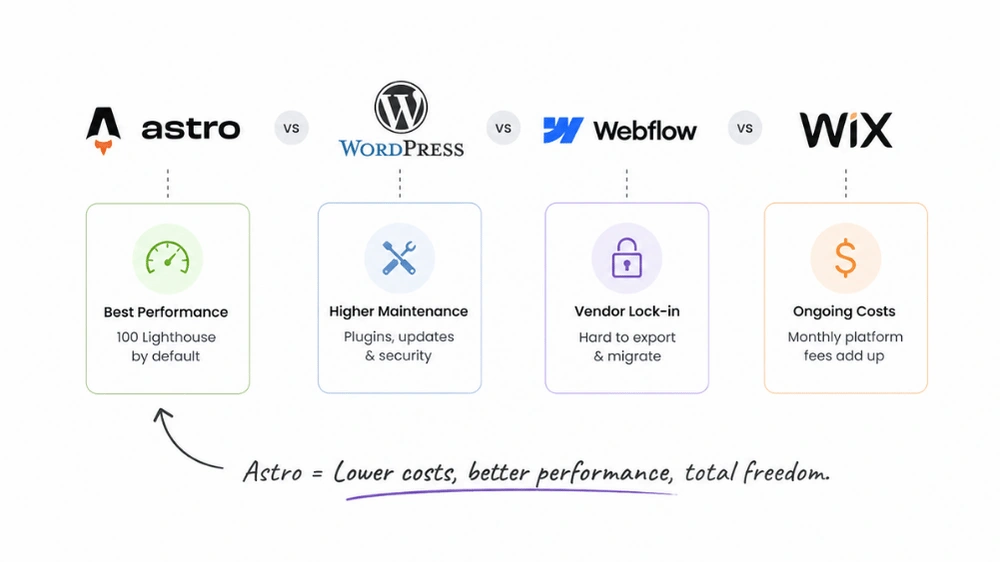
This is where the real conversation happens. Many businesses default to WordPress because it is familiar, or Webflow because it looks polished. But when you factor in the full picture including initial build cost, ongoing hosting, maintenance, and the hidden cost of developer dependency, Astro often comes out significantly cheaper over a 3-year horizon.
| Platform | Initial Build Cost (Marketing Site) | Monthly Hosting / Platform Fee | Annual Maintenance | Developer Lock-in Risk | Performance Out of the Box |
|---|---|---|---|---|---|
| Astro | $15,000 - $50,000 | $0 - $20/mo (CDN hosting) | Low ($500 - $2,000/yr for updates) | None (open source, you own the code) | Excellent (100 Lighthouse default) |
| WordPress | $8,000 - $40,000 | $30 - $100/mo (managed hosting) | High ($3,000 - $10,000/yr for plugins, security, updates) | Medium (plugin ecosystem dependency) | Poor to moderate (requires heavy optimization) |
| Webflow | $8,000 - $35,000 | $23 - $49/mo (CMS/Business plans) | Low-medium (platform handles it, but vendor-locked) | High (proprietary platform, hard to export) | Good (faster than WordPress, slower than Astro) |
| Wix | $3,000 - $15,000 | $17 - $159/mo depending on plan | Low (platform managed) | Very High (essentially impossible to migrate cleanly) | Moderate (limited performance control) |
A few things jump out from this comparison. WordPress looks cheap on the surface because the software is free, but ongoing maintenance costs are real. Plugin updates break things. Security vulnerabilities in WordPress plugins are a constant issue. A managed WordPress hosting plan alone runs $30 to $100 per month, and any serious plugin suite adds another $300 to $1,000 per year in licensing fees.
Webflow solves the maintenance problem by handling it for you, but you pay for that convenience with vendor lock-in. If you want to leave Webflow, you are essentially starting over. And at $23 to $49 per month for a CMS-connected site, the costs compound over time without you getting anything new in return.
Wix is the cheapest to get started with, but it is the hardest to grow out of. The development ceiling is low, performance control is limited, and migrating away from Wix cleanly is genuinely painful.
Astro development cost is higher upfront compared to Wix and comparable to WordPress and Webflow. But the total 3-year cost of ownership for an Astro site is almost always lower. You own the code, hosting is near-free, and no platform subscription fees are eating into your budget every month.
Read these migration guides:
Transform your heavy WordPress setup into a lightning-fast headless Astro site.
Break free from platform lock-in and optimize performance by moving Wix to Astro.
Combine Webflow’s visual design precision with Astro’s ultra-fast modern web framework.
Who Should Build Your Astro Site?
Your options fall into three broad buckets.
Freelancers are the most affordable route. An experienced Astro developer in India or Eastern Europe typically charges $30 to $80 per hour, putting a 40-hour marketing site project in the $1,500 to $3,500 range. The tradeoff is coordination overhead and the risk of working with someone who calls themselves an Astro developer but actually learned it last month for your project.
Specialist Astro Development agencies are the best choice for projects with real business stakes. Dedicated Astro practices bring CMS integration experience and migration track records that generalist agencies typically lack. Rates for specialists typically run $5,000 to $50,000+ depending on scope, but you get predictable delivery and accountability that’s hard to find elsewhere.
In-house developers make sense if Astro is going to be part of your long-term stack. The learning curve for a React or Vue developer picking up Astro is relatively shallow, and the payoff in ongoing maintenance savings is significant.
Factors That Drive Astro Development Cost Up
Even with a clear budget in mind, projects have a habit of expanding. Here are the factors most likely to push your astro development cost above the initial estimate:
-
Custom animations and interactions built in GSAP or Framer Motion add significant development hours
-
Multiple language support requires additional CMS configuration and testing across all locales
-
AI integrations such as semantic search, chatbots, or AI-generated content feeds require backend work that sits outside standard Astro builds
-
E-commerce functionality added via integrations like Stripe or Snipcart requires careful architecture
-
Extensive content migration from a large existing site is time-consuming and often underestimated
Conclusion
By now, the cost picture is clear. Astro is not the cheapest option on day one if you are comparing it to a Wix template or a basic WordPress theme. But it is the smartest long-term investment for any business that cares about performance, search visibility, and not paying an agency every time a plugin breaks.
If you are starting fresh, you get a codebase you actually own, hosting costs that are essentially zero, and a site that hits 100 on Lighthouse without heroic optimization effort. If you are migrating from WordPress or Webflow, you get all of that plus freedom from vendor lock-in, unpredictable maintenance bills, and the slow page speeds that are quietly costing you conversions every single day.
At Enacton Technologies, we are a software development company with 13+ years of experience, 500+ projects delivered, and 350+ clients served across 65+ countries. We build and migrate high-performance Astro websites, pairing cutting-edge frontend development with AI/ML integration, headless CMS setup, and edge deployments, so your site launches fast and stays that way.
Get a clear cost and timeline for your Astro build or migration.
FAQs
Is Astro free to use?
Yes, Astro is completely open-source and free. You pay nothing for the framework itself. The Astro development cost you incur is entirely for the developer or agency building the site, plus any paid CMS subscriptions or third-party service integrations your project requires.
How much does Astro hosting cost?
Almost nothing compared to other platforms. Platforms like Netlify, Cloudflare Pages, and Vercel offer free tiers that comfortably handle most small to mid-size Astro sites. High-traffic sites might spend $20 to $50 per month on hosting. Compare that to $30 to $100 per month for managed WordPress hosting and the difference adds up fast.
Is Astro cheaper than WordPress long-term?
In most cases, yes. WordPress development cost upfront can be similar, but the ongoing cost of managed hosting, plugin licenses, security maintenance, and developer time for emergency fixes makes WordPress significantly more expensive over a 2-3 year window. Astro eliminates most of those recurring costs.
How long does an Astro project take to build?
A simple marketing site takes 1 to 4 weeks. A full startup site with a headless CMS, custom design, and animations takes 4 to 8 weeks. Large enterprise builds or complex migrations can run 12 to 20 weeks depending on scope.
Can I migrate my WordPress site to Astro without losing SEO?
Yes, but it requires careful handling of URL structures, 301 redirects, metadata, and Core Web Vitals benchmarking before and after the migration. Reputable Astro agencies build zero-SEO-loss guarantees into their migration process. It is worth asking any agency you consider for specific examples of migrations they have completed and what happened to client rankings in the 60 to 90 days after launch.
Does Astro work with a CMS?
Absolutely. Astro integrates natively with Storyblok, Sanity, Contentful, DatoCMS, Cloudcannon, and more. The CMS handles editorial workflows and content updates, while Astro handles rendering performance. Most Astro agency projects include a CMS integration as standard.
What is the cheapest way to get an Astro site built?
The cheapest route is hiring a freelance Astro developer from a market like India or Eastern Europe, where experienced developers are available at $30 to $80 per hour. Using a starter theme from astro.build/themes as a foundation can also cut development hours significantly on simpler projects.