A Founder’s Guide to MVP Website Development
Every founder starts with an idea that feels undeniable. The hard part is proving whether users see the value too. In 2027, MVP website development has become the most effective way to make that proof real. Following a clear MVP development process and estimating realistic MVP development costs helps founders launch without blowing early runway.
Short answer: In web development, MVP stands for minimum viable product: the smallest working version of a website or web app that lets real users complete the one action your idea depends on, such as booking, buying, or creating something, so you can measure whether they want it before building the rest. It does more than a landing page, because people can actually use it, and has fewer features than the full platform, but built properly, it is the first version of your real product.
The numbers explain why. CB Insights’ 2026 analysis of 431 VC-backed startups that shut down since 2023 found that 70% ran out of capital, but the most telling root cause was poor product-market fit, cited by 43%. Most of those companies spent their money building before they knew the market wanted the product (more in our MVP statistics). An MVP website is the cheapest way to find out first.
The psychology behind their popularity is powerful. For founders, launching a website early creates clarity and evidence. For customers, engaging with a brand at its earliest stage feels like co-ownership of the journey. This shared experience makes the relationship stronger from day one.
Reid Hoffman, co-founder of LinkedIn, summed this up well: “If you are not embarrassed by the first version of your product, you’ve launched too late.” MVP websites carry that truth into practice by giving founders something real to measure against, not a guess on a whiteboard (read our complete foundation on what an MVP is).
Why MVP Websites are Popular in 2027
Two things have pushed founders toward launching a website first. Building has become faster: modern frameworks, managed hosting, and AI-assisted coding mean a focused web MVP can go live in weeks instead of quarters. And many early-stage investors would now rather see real usage than another pitch deck. A website is the quickest place to show that usage, because anyone can open it from a link, with no app store review in the way.
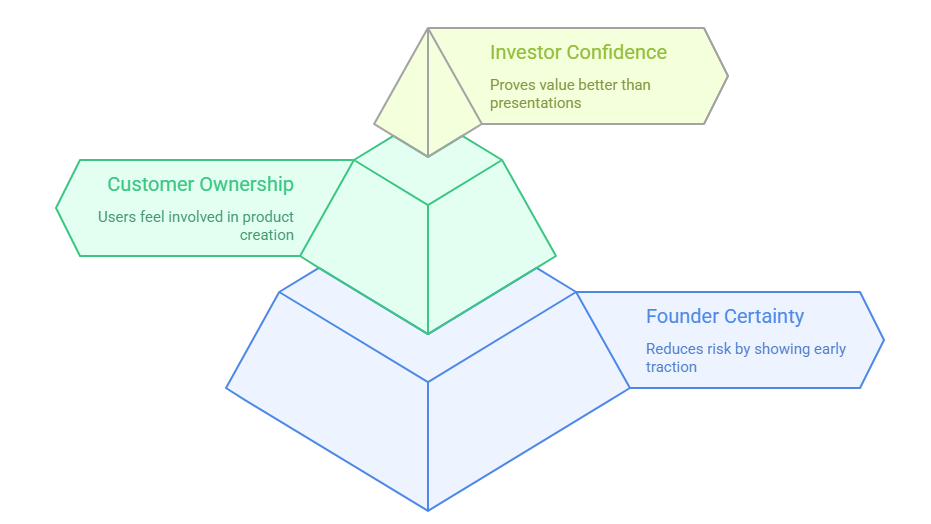
Why the popularity has grown:
● Founder Psychology: Building an MVP website creates certainty in a world of risk. Founders see early traction and adjust course quickly.
● Customer Psychology: Users enjoy early access and the sense that they are helping create a product. This feeling of ownership deepens brand loyalty.
● Investor Psychology: Traction, even in small numbers, speaks louder than pitch decks. A live MVP website proves more than a slide presentation ever could.
MVP websites succeed because they serve all three audiences at once.
What Does MVP Mean in Web Development?
In web development, an MVP website (or MVP web app) is a working product that highlights your idea’s most valuable feature. It is functional enough to deliver value and gather feedback, yet focused enough to build quickly.
This is distinct from a one-page teaser or a full product. A landing page may only capture interest through signups. A full web platform may overwhelm budgets and timelines before validation. The MVP website balances both.
Key traits of an MVP website:
● Users can perform the essential action your idea is built around.
● Founders can track whether the problem being solved matters in practice.
● Development teams can evolve quickly without waiting for months of build cycles.
For cloud platforms pursuing SaaS MVP development, mobile-first services evaluating MVP app development, and service marketplaces, a dedicated web MVP becomes the most direct way to validate demand without premature overhead.
MVP Website vs. Landing Page vs. Full Website
Many founders confuse MVP websites with other formats. Here’s a simple comparison to bring clarity:
| Feature | Landing Page | MVP Website | Full Website |
|---|---|---|---|
| Purpose | Capture early interest | Validate idea with core functionality | Deliver complete product experience |
| Scope | One or two static pages | Limited but functional features | Fully built features and integrations |
| Example | Email sign-up for waitlist | Checkout flow with 1–2 products | Marketplace with hundreds of products |
| Feedback | Interest only | Behavioral data + early revenue | Long-term growth data |
This table shows why an MVP website is the middle ground. It tests behavior, not just curiosity, while avoiding the heavy lift of a full-scale build.
MVP Website or MVP Web App?
Founders often use the two terms for the same thing, but the difference decides your budget and your stack.
- Build an MVP website when the value is in information and a single conversion: a service people book, a product people order, a directory people browse. Most pages can be public, and a CMS or static framework handles the content.
- Build an MVP web app when users log in and come back to do work: a SaaS dashboard, a marketplace where sellers manage listings, an AI tool that processes their files. That needs accounts, a database, permissions, and often payments, so it is real software development and costs more.
A quick test: if a user’s second visit looks the same as their first, you are building a website. If their second visit depends on what they did the first time, you are building a web app.
Which Type of MVP Website Are You Building?
What belongs in version one depends on the kind of product. These are the patterns we see most often when founders bring us an MVP web project:
| Type | Must work on day one | Can wait until users ask | Signal that it’s working |
|---|---|---|---|
| SaaS web app | Sign-up, the one core workflow, a simple dashboard, billing | Team accounts, integrations, advanced reports | Users repeat the core workflow in week two |
| Marketplace (two-sided) | Listings from one side, search or browse for the other, a way to transact or get in touch | Reviews, recommendations, seller analytics | Buyers return and sellers list without being chased |
| E-commerce store | Product pages, cart, checkout, order emails | Loyalty points, wishlists, multi-currency, personalization | Repeat orders, not just first purchases |
| Booking or appointment platform | Availability, booking, confirmations and reminders, payment or deposit | Calendar sync for every provider, memberships, packages | Few no-shows and repeat bookings |
| AI-powered tool | One input, one AI-generated output, a way for users to correct it | Multiple models, multi-step workflows, team sharing | Users accept or lightly edit the output instead of redoing it |
If AI is the core of your product rather than one feature, see how we approach AI MVP development.
For a marketplace, launch in one city or one niche first. A thin marketplace spread across many categories feels empty to both sides, while a dense one in a single niche shows you quickly whether the model works.
The Core Principle: The Lean Development Process
MVP website development is guided by the lean development process. Its foundation is the Build–Measure–Learn loop:
● Build: Launch a minimal version with core functionality.
● Measure: Observe how users behave. Where do they click? Where do they leave? What excites them?
● Learn: Refine based on patterns, not assumptions.
Checklist for applying lean development to websites:
● Keep the homepage focused on the core value proposition.
● Simplify the navigation to highlight primary actions.
● Track metrics like bounce rate, sign-up conversion, and cart completion.
● Run usability sessions with a small group to validate early impressions.
Eric Ries, who pioneered this methodology, wrote: “The only way to win is to learn faster than anyone else.” Websites give founders this speed, with analytics that provide answers almost instantly.
Your Strategic Blueprint: Creating a Minimum Viable Product Roadmap
A minimum viable product roadmap provides direction and discipline. Without an effective MVP launch strategy in place, MVP websites risk becoming too scattered or feature-heavy.
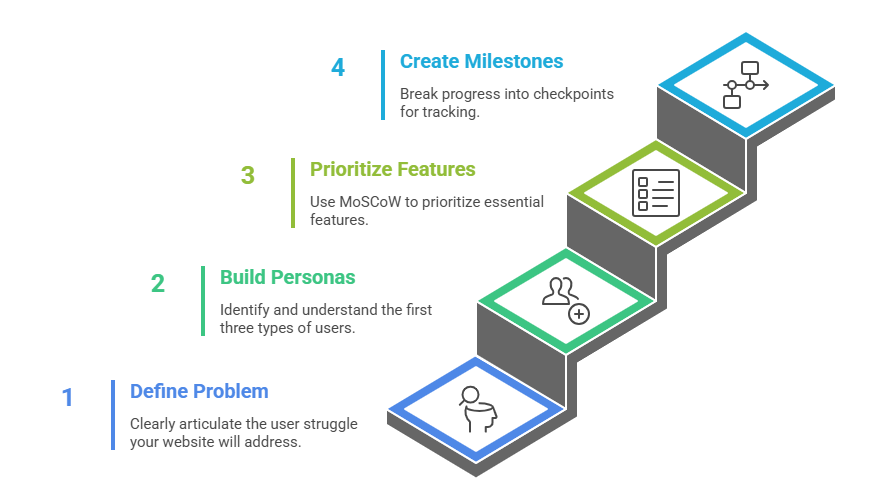
What to include in a strong roadmap:
**1. Define the Problem Clearly
**What is the user struggle your website will address? Put it into one sentence.
**2. Build User Personas
**Identify the first three types of users. For example, an MVP job board may target recruiters, freelancers, and small businesses.
**3. Prioritize Features with MoSCoW
**● Must-have: Core action like posting a listing.
● Should-have: Filters or search.
● Could-have: Social sharing.
● Won’t-have (for now): Personalized recommendations.
**4. Create Milestones
**Break progress into checkpoints. Example: Week 2 – working homepage, Week 4 – functional sign-up flow, Week 6 – first feedback review.
This roadmap becomes a living guide. It reassures investors, keeps teams aligned, and ensures the build serves strategy rather than drifting into scope creep.
How to Create an MVP Website: A 6-Step Process
When founders ask us how to create an MVP website, this is the process we follow.
Step 1: Market Research & Defining Core Functionality
● Study existing websites in the niche.
● Collect feedback from early potential users.
● Define one central use case to validate.
Step 2: Crafting the MVP Requirements Document
The MVP requirements document lays the foundation. It includes:
● Functional features (sign-up, product display, checkout).
● User stories (e.g., “As a visitor, I want to sign up in two clicks”).
● Technical notes (hosting plan, CMS, security requirements).
Step 3: MVP Web Design & Prototyping
Good MVP web design is about clarity, not decoration. Design the three or four screens your core flow needs (for example: landing, sign-up, the core action, and the result) and nothing else.
- Start with wireframes, then a click-through prototype in a tool like Figma, and test it with five or so target users before any code is written.
- Use a ready-made design system or component library instead of designing every component from scratch. It looks professional, stays consistent, and saves weeks.
- Skip what doesn’t help users decide: custom illustrations, animations, and multiple themes can come after validation.
- Don’t skip the basics: readable text, clear buttons, mobile layouts, and accessible color contrast. Minimal should never mean confusing.
Step 4: Technology Stack Selection
Pick the stack for what you are testing, not for what’s fashionable:
| Approach | Best for | Watch out for |
|---|---|---|
| No-code (Webflow, Bubble) | Smoke tests and simple MVPs you may throw away | Platform limits and lock-in once the logic gets complex |
| AI app builders (Lovable, Bolt, v0) | Clickable prototypes to show users and investors within days | Security, data handling, and code quality are rarely production-ready |
| Custom code (React or Next.js front end; Node.js, Laravel, or Python back end) | Products you plan to grow, with real users and real data | Needs an experienced team to stay lean |
| Content frameworks (Astro, Next.js) with a headless CMS | Content-led MVP websites where speed and SEO matter | Not built for heavy app logic on their own |
Keep integrations to what the core flow needs (payments, email, analytics) and choose managed hosting so you aren’t maintaining servers before you have users. If you have already built a prototype with an AI tool, it doesn’t have to be thrown away: our vibe coding development team audits and productionizes prototypes from Lovable, Bolt, Replit, Cursor, and v0.
Step 5: Agile Development Sprints
● Break work into two-week increments.
● Deliver a functional slice in each sprint.
● Collect feedback continuously.
Step 6: Testing, Deployment, and Feedback Collection
● Test across multiple devices and browsers.
● Use analytics tools like Hotjar or GA4 for behavioral tracking.
● Gather qualitative feedback through surveys, interviews, and structured tester acquisition strategies.
Common Mistakes in MVP Website Development
Even with a clear process, founders make recurring mistakes when working on MVP websites. Reviewing our comprehensive breakdown of the 10 mistakes to avoid before developing your MVP will keep your launch on schedule:
● Overloading Features: Adding too much too soon slows launch and dilutes learning.
● Ignoring Analytics: Without early tracking tools, valuable user insights go to waste.
● Weak MVP Requirements Document: Ambiguous documentation creates confusion across teams.
● Neglecting UX Design: Minimal does not mean clumsy; MVP websites still need intuitive flow.
● No Iteration Plan: Launching without a cycle for improvement leaves the website stagnant.
Avoiding these mistakes when planning how to create an MVP website ensures that development delivers learning, not waste.
Real-World MVP Website Examples That Succeeded
Reviewing top SaaS MVP examples and classic minimum viable product examples illustrates how simple beginnings create lasting companies. Let’s look at a few we know and love:
Notion (Ivan Zhao, Simon Last)
Notion’s first version did not work. As Sequoia’s profile of the company recounts, it began as a tool for non-coders to build their own apps, and the web framework it was built on crashed constantly. Ivan Zhao later said of it, “It was not really a product.” In 2015 the founders laid off their small team, left San Francisco for Kyoto to cut costs, and rebuilt Notion around a simpler idea: notes and documents made of flexible blocks.
The rebuilt Notion 1.0 launched in 2016 and took off on Product Hunt. That narrower version, built around one everyday job, is the one that grew.
What you can learn: an MVP that tries to do everything is hard to validate and expensive to fix. Narrowing the first version to one job users already do is what saved Notion. A strong minimum viable product roadmap should leave room for that kind of pivot.
Canva (Melanie Perkins, Cliff Obrecht)
Canva’s real MVP wasn’t Canva. In 2007, Melanie Perkins and Cliff Obrecht started Fusion Books, a simple online tool that let schools design their own yearbooks, run from Perkins’ mother’s living room. It tested one narrow slice of her bigger idea: that design could move online and become simple enough for people with no design training.
Schools signed up, and Fusion Books grew into one of the largest yearbook businesses in Australia. That proof, plus years of pitching investors, led to the launch of Canva in 2013 as a browser-based design tool for everyone.
What you can learn: you can validate a big idea through a small, specific market first. If you’re figuring out how to create an MVP website for a broad vision, find the audience with the sharpest version of the problem and build for them.
Zapier (Wade Foster, Bryan Helmig, Mike Knoop)
Zapier’s story shows the power of speed. Wade Foster, Bryan Helmig, and Mike Knoop built their first automation prototype in just two days at Startup Weekend. The team then launched a stripped-down beta website, inviting niche online communities to try it out.
Instead of giving it away for free, they charged for early access: on November 30, 2011, they sold their first beta invite for $100. That move turned users into invested partners, ensuring feedback came from people who truly cared. Every iteration of the MVP was guided by customer insights, which made scaling far smoother later.
What you can learn: Not all MVP website examples are free. Even small, paid betas can reveal whether customers see enough value to spend money. Use focused landing pages and online communities to test willingness to pay before committing to large builds.
Each example reveals the same truth: MVP websites succeed when they focus on validation that is true to them.
Checklist: Is Your MVP Website Ready to Launch?
Before you push your MVP website live, use this quick launch checklist:
Technical Readiness
● Main content loads within 2.5 seconds on mobile (Google’s Core Web Vitals “good” threshold).
● Responsive across desktop and mobile.
● Core flows tested (sign-up, checkout, form submissions).
Business Readiness
● Clear CTA is visible above the fold.
● MVP requirements document updated post-build.
● Analytics tools installed (GA4, Hotjar, Mixpanel).
User Readiness
● Copy explains the core value in one sentence.
● Navigation feels simple and intuitive.
● Early trust signals visible (testimonials, secure checkout, contact info).
An MVP website that checks these boxes is ready for real users.
How Much Does an MVP Website Cost, and How Long Does It Take?
It depends mostly on whether you are building a website or a web app, and how many types of users it serves. As a guide, from our own pricing:
- A landing page test to gauge interest can go live within a week or two, often on a no-code tool.
- A Basic MVP (one user type, one core workflow, sign-up and payments) typically costs $5,000–$10,000 and takes 8–12 weeks.
- A SaaS web app MVP usually falls between $5K and $20K, a two-sided marketplace between $12K and $35K because it needs two sets of users, search, and payments, and an AI-powered product between $15K and $35K.
Market rates vary widely: US agencies often quote $50K–$250K for similar scope. Our MVP cost guide breaks down what each budget buys, by product type.
Your MVP Website Is Live: What to Do in the First 30 Days
Launch is when the learning starts. In the first month:
- Watch the core action, not traffic. How many visitors sign up, and how many of those complete the one action the MVP exists for?
- Check who comes back. Return visits in week two and week four tell you more than launch-day numbers.
- Talk to users. Five to ten short calls with real users, especially those who signed up and left, explain what your analytics can’t.
- Fix friction before adding features. Most early drop-off comes from confusing steps, slow pages, or bugs, not from missing features.
- Decide on purpose. At the end of the month, choose to double down, change direction, or stop, based on what users actually did.
For ways to get your first users to the site, see our guide to MVP launch strategies.
Additional Best Practices for MVP Website Development
Beyond the core steps, successful founders often follow certain principles.
● Design for Scalability: While the MVP is small, choose a stack that allows future growth.
● Use Analytics Early: Install tools like Google Analytics and heatmaps from day one.
● Prioritize Accessibility: Even a minimal website must be usable across devices and for diverse audiences.
● Keep Documentation Alive: Update the MVP requirements document with every sprint to reflect reality.
● Plan Iteration Cycles: Treat every launch as the start of the next version.
The Future of MVP Websites in 2027 and Beyond
The future of MVP website development is shaped by new tools and expectations:
● AI Prototyping: Generating wireframes and initial boilerplates rapidly, while balancing trade-offs analyzed in MVP vibe coding pros and cons.
● No-Code Development: Tools like Webflow and Bubble speed up early smoke tests.
● Personalized MVPs: Early websites now test personalized onboarding experiences, not just static features.
● Instant Analytics: Real-time feedback tools allow iterations almost instantly.
● Global Reach: Even small MVPs launch globally thanks to modern edge hosting and internationalization.
This evolution means founders can validate faster and more accurately than ever before.
FAQs
What is MVP website development?
It is the process of creating a functional website with core features only, designed to validate ideas with real users before investing in a full build.
What does MVP mean in web development?
In web development, MVP stands for minimum viable product: the smallest working version of a website or web app that lets real users complete the one action your idea depends on, so you can measure whether they want it before building the rest.
How do I know which features to include in an MVP website?
Start from the one action your idea depends on and include only what a user needs to complete it. Then sort everything else with a framework like MoSCoW (must-have, should-have, could-have, won’t-have) and leave the could-haves for later unless early users ask for them.
How long does it take to build an MVP website?
A landing page test can go live within a week or two. A working MVP website or web app with sign-up, the core action, and payments usually takes 8–12 weeks. Builds with more moving parts, such as two-sided marketplaces or AI features, typically take 12–20 weeks.
What are some famous MVP website examples?
Zappos, Buffer, and Airbnb all began as simple websites that validated demand before scaling (see our full breakdown of 15 minimum viable product examples).
Why should I work with a professional team for MVP website development?
An experienced team helps you decide what to leave out, picks a stack that won’t need a rewrite once users arrive, and builds in testing, security, and analytics from the start. That matters because early users who hit a broken flow rarely come back for a second try.
Should my MVP be a website or a mobile app?
Start with a web MVP unless your idea depends on something only a phone does well, such as GPS, the camera, push notifications, or offline use. A web MVP costs less, needs no app store approval, and can be updated daily while you learn. Our MVP app development guide covers the mobile route.
How much does MVP website development cost?
With EnactOn, a Basic MVP starts at $5,000 and typically costs $5,000–$10,000. A SaaS web app MVP usually costs $5K–$20K, a two-sided marketplace $12K–$35K, and an AI-powered product $15K–$35K. US agencies often quote $50K–$250K for similar scope.
How to Choose an MVP Web Development Company
If you are hiring help, these questions separate a good partner from an expensive one:
- Do they push back on scope? A good team asks which features your first users really need. One that agrees to everything will build you a bigger, slower MVP.
- Can they show MVPs that grew? Ask for products that went from a first version to a real platform, not just launch-day screenshots.
- Who reviews the code? Especially if they use AI tools, ask how code is reviewed and tested before it ships.
- What does the quote include? Hosting, analytics setup, and post-launch fixes are easy to leave out.
- Will they stay after launch? The first weeks after launch are when you will need changes fastest.
Why Work with EnactOn?
EnactOn has been building software since 2013, with 500+ products delivered for clients in 65+ countries. What founders get from our MVP development services:
- Product mindset: we think like a product owner, not a vendor, and weigh every feature by the value it brings to your users and your business.
- Help deciding what to leave out: our Target-Market Alignment Framework helps you spot the features your first users don’t need, so the budget goes into what proves the idea.
- Builds that hold up: every release passes a four-gate pipeline covering functional, security, performance, and deployment checks.
- Experience on both sides of the table: we have built, launched, and monetized our own products, including Coupomated, dealZkart, KouponPlus, and Proposal.Biz, alongside client MVPs in SaaS, e-commerce, healthtech, fintech, food delivery, EdTech, and AI tools.
- A path past the MVP: MVPs start from $5,000, and we stay with the product as it grows into a full-fledged platform through our custom software development services.
Ready to start? Talk to us about your MVP website, and we will help you decide what version one needs.