
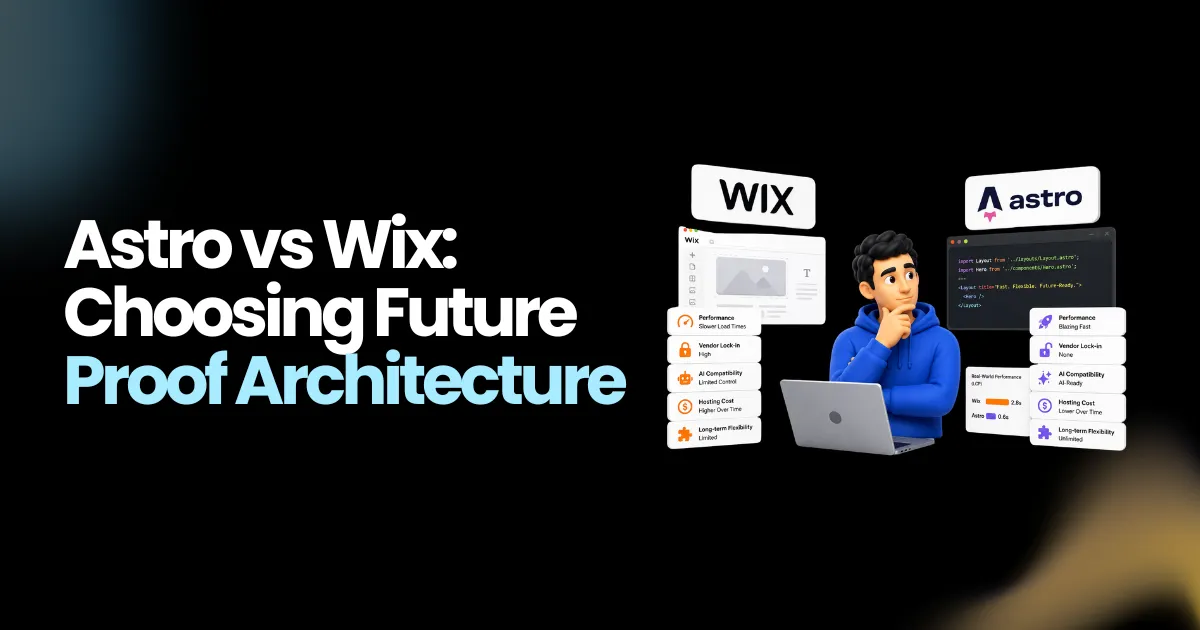
Millions of businesses built their first website on Wix. The drag-and-drop editor made it possible to go live in an afternoon without writing a single line of code. That was the promise, and for many businesses at that stage, it delivered. But the web has moved on. AI coding agents, Git-based content workflows, and CDN-edge rendering have changed what a performant, maintainable website looks like in 2026. In that context, the Wix vs Astro debate is not a technical argument. It is a business decision about what your website costs you, who controls it, and whether it can grow with you.
This article examines the Astro vs Wix comparison across every dimension that matters: performance, vendor lock-in, AI compatibility, hosting cost, and long-term flexibility. The data comes from published migration guides, benchmark research, and Cloudflare’s January 2026 acquisition press release on Astro. Nothing here is opinion dressed as fact.
Why Wix Is Not Relevant Anymore for AI-First Web Development?
Wix was designed for one type of user: a non-technical operator who wants a website live today and never wants to think about code. That is a legitimate need, and Wix fills it well at the start. The problem is what happens next.
The Lock-In Is the Product
Multiple independent migration guides identify Wix as having the most aggressive vendor lock-in of any major website platform. This is not a subjective criticism. These are documented platform behaviors.
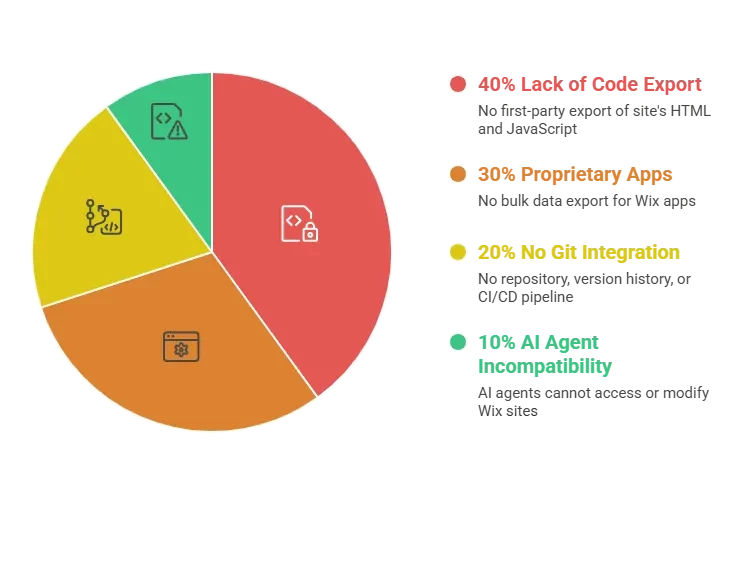
There is no first-party export of your Wix site. The published HTML is JavaScript-rendered with no semantic markup. Class names are hashed strings like _2gMbR. Proprietary Wix apps — Wix Stores, Wix Bookings, Wix Members — have no bulk data export path. If you want to leave Wix, you are not downloading your site and moving it somewhere else. You are rebuilding it from screenshots and scraped HTML.
AI Agents Cannot Work With Wix
This is the core reason Wix is incompatible with AI-first development. AI coding agents work with files: Markdown documents, TypeScript components, versioned code stored in Git. Wix has none of that. There is no repository, no version history, no CI/CD pipeline, and no way for an AI agent to open your site, read its content, and make changes at scale. When teams using Claude Code, Cursor, or Windsurf want to automate content updates, restructure pages, or build new sections programmatically, Wix simply does not have an entry point for those tools.
Astro does. Every page is a file. Every piece of content is Markdown or MDX in a Git repository. TypeScript schemas define the content structure. An AI agent on an Astro codebase can read, edit, test, and deploy changes across thousands of pages. That capability gap is not closing on Wix, because Git-based workflows are not part of the platform’s design.
Platform Fees That Compound Over Time
Wix’s premium plans start at approximately $17 per month and climb to $159 per month on Business Elite tiers, according to Wix’s published pricing. That fee does not diminish over time. It compounds. A business paying $39 per month on a Core plan spends $2,340 over five years, for a platform they do not own and cannot export. When that same business realizes it has outgrown Wix’s performance ceiling or SEO capabilities, the migration cost is added on top. The platform fee for two years often exceeds the one-time cost of a custom Astro build.
Planning an Astro build? See what affects the development cost.
Astro vs Wix: Which Is the Best Choice for AI-First Website Development?
| Criterion | Astro | Wix | Winner |
| Default JavaScript payload | Zero JS by default | Heavy JS-based rendering engine | Astro |
| Lighthouse Performance score | 95–100 typical | 50–70 range on mobile (migration writeups) | Astro |
| LCP / TTFB | Sub-second on CDN edge | Community reports of 2.5–5s page loads | Astro |
| HTML output quality | Clean semantic HTML, developer-controlled | Deeply nested divs, hashed class names, no semantic markup | Astro |
| Image optimization | Built-in, AVIF/WebP, srcset, permanent URLs | CDN-optimized but URLs are not permanent | Astro |
| SEO control | Full developer control of meta, structured data, canonical URLs | Limited technical control; structured data requires Wix Studio or paid apps | Astro |
| Content export | Markdown/MDX in Git, fully portable | No site export at all; XML blog export only, no images, no pages | Astro |
| Code ownership | Full code ownership | None — site exists in Wix’s proprietary system | Astro |
| Version control | Git-native | None | Astro |
| CI/CD pipelines | Standard GitHub Actions, Vercel, Netlify, Cloudflare | None | Astro |
| TypeScript support | First-class throughout | Velo IDE supports JS; full TS not at framework parity | Astro |
| Visual editor | Requires headless CMS pairing | Best-in-class drag-and-drop editor | Wix |
| Learning curve | Requires JavaScript, CLI, Git | Low — designed for non-technical users | Wix for beginners; Astro for developers |
| Customization ceiling | Effectively unlimited — full code control | Constrained by Wix’s component model | Astro |
| Hosting cost | $0/month on Cloudflare Pages, Netlify, Vercel free tiers | ~$17–$159/month on premium plans | Astro |
| Vendor lock-in | None — MIT-licensed, portable | Maximum of any major platform | Astro |
| App/plugin ecosystem | Hundreds of integrations | Wix App Market, thousands of apps | Wix by count |
| Template ecosystem | Hundreds of themes on official showcase | 800+ templates | Wix by count |
| Security attack surface | Static HTML on CDN, no admin panel | Wix manages platform security | Astro |
| AI agent compatibility | Full — content is code in Git | None | Astro |
| Animation and interactivity | GSAP, Motion One, View Transitions, custom CSS | Built-in animation editor, limited vs code | Astro |
| Migration difficulty away from platform | Trivial — content is in Git | Maximum difficulty — no export path | Astro |
1. Performance Is Not Configurable on Wix
The Astro vs Wix performance gap is structural, not a matter of settings. Astro delivers zero client-side JavaScript by default. A standard content page built in Astro sends pure HTML to the browser, with the framework’s rendering work done entirely at build time or on the server. Wix’s rendering engine is JavaScript-based. Every page load carries the platform’s JS runtime, plus the runtime for each app the site uses. Published migration writeups consistently report Wix Lighthouse scores in the 50 to 70 range on mobile, against Astro’s typical 95 to 100. Community reports describe page loads of 2.5 to 5 seconds on Wix for sites that, after migration, load in under one second on Astro.
2. Core Web Vitals and Search Rankings
The Wix vs Astro SEO comparison begins and ends with page speed. Google’s Core Web Vitals are a confirmed ranking factor, and static HTML delivered from a CDN edge is the most reliable way to pass them. Astro origins pass Core Web Vitals at approximately 60 percent, according to HTTP Archive and Chrome UX Report data. Wix-specific benchmark data from a rigorous primary source was not identified in published research, but the structural disadvantage of a JavaScript-rendered platform is consistent with the lower scores reported across migration writeups. For any business competing on local SEO or organic search, the speed difference is commercially meaningful.
3. Vendor Lock-In: The Most Important Practical Difference
No single factor in the Wix vs Astro comparison matters more to a business’s long-term flexibility than this one. On Astro, your content lives in Markdown files in a Git repository you own. If you want to change hosts, change frameworks, or change nothing and just keep running, the content moves with you. On Wix, your content lives in Wix’s database. The published HTML is intentionally JavaScript-rendered and contains no semantic structure. The platform explicitly prevents bulk export of content, images, and app data. Multiple independent sources, including BrowserCat, LitExtension, and Lucky Media, identify Wix as the most lock-in-intensive major platform available. That is not a marketing claim. It is a documented architectural reality.
4. AI-First Development: A Capability Gap With No Workaround
The Astro vs Wix comparison on AI compatibility is binary. Astro is fully compatible with AI-first development workflows. Every piece of content is a file. Every component is code. Every change is a Git commit that can be made by an AI agent, reviewed by a developer, and deployed automatically. Wix has no equivalent path. There is no repository, no file system, and no API surface that allows AI coding agents to read and modify site content at scale. As teams adopt AI-driven development, the Wix platform becomes an island that those tools cannot reach.
5. Hosting Cost Over Time
A static Astro site on Cloudflare Pages costs nothing per month. Cloudflare Pages includes unlimited bandwidth on the free tier. Netlify and Vercel also offer free tiers that cover most small to medium business sites. Wix charges between $17 and $159 per month depending on the plan, every month, indefinitely, for a site you do not own and cannot export. Over five years, a Wix Core plan at $39 per month costs $2,340. An Astro site on a free CDN tier over the same period costs $0 in hosting. The one-time development cost of an Astro build, which migration specialists typically estimate at several weeks of work, often pays for itself within the first 18 to 24 months of hosting savings alone.
6. Code Ownership and Version Control
Every file in an Astro project is owned by the team building it. The source is in a Git repository, with full commit history, branching, pull requests, and CI/CD pipelines. Changes can be reviewed before deployment. Rollbacks are instantaneous. Wix provides none of this. There is no version history for visual edits, no branching for testing changes in isolation, and no standard CI/CD integration. For any business that treats its website as a strategic asset rather than a brochure, the absence of version control is a meaningful operational risk.
Own your code, review every change, and roll back safely with Astro.
7. SEO Technical Control
Technical SEO on Astro is fully in the developer’s hands. Meta tags, canonical URLs, structured data, Open Graph tags, sitemap generation, robots.txt, image alt attributes, and heading hierarchy are all written directly in code. There are no platform limitations, no plugin dependencies for basic SEO configuration, and no per-feature fees. Wix provides a built-in SEO panel that covers the basics, but advanced technical SEO, including structured data configuration and canonical URL handling for complex URL structures, requires Wix Studio or paid third-party apps. The Wix vs Astro SEO gap widens as site complexity grows.
8. Customization Ceiling
An Astro site has no practical customization ceiling. React, Vue, Svelte, Solid, and any other JavaScript library can be added as interactive islands. Custom server logic, complex filtering, authentication systems, and API integrations are written in standard code. Wix is constrained by its component model and the Velo scripting environment. Custom code embeds add interactivity, but they operate within platform boundaries that Wix controls. For businesses that expect their site requirements to grow, the Astro vs Wix customization comparison points to a platform that grows with the business versus one that constrains it.
Ready to Move Your Wix Site to Astro?
Enacton handles the full Wix-to-Astro migration process — from content extraction and design rebuild to URL mapping, third-party integrations, and deployment on a zero-cost CDN infrastructure. If your Wix site is costing you in platform fees, search performance, or developer flexibility, we will show you exactly what the move looks like.
[Get a Free Wix Migration Assessment]

When and Who Should Consider Astro for Their Website Development?
The Wix vs Astro decision is determined by one variable more than any other: whether the operator is technical or not. Wix was built for non-technical operators who need a site live today. Astro was built for developers who need a site that performs, scales, and integrates with modern tooling. Those are different buyers with different constraints, and the right platform depends entirely on which profile fits.
Consider migrating from Wix to Astro when:
- Your Wix site is performing poorly on Google. Slow Core Web Vitals are hurting rankings for local searches, and the gap between your site’s page speed and that of competitors is visible in organic traffic data.
- The monthly platform fee has stopped feeling like value. When two years of Wix fees exceed what a one-time Astro build would cost, the economic argument for migration is clear.
- Your business needs integrations that Wix does not support. Custom authentication, complex content models, internal system integrations, or AI-powered features are difficult or impossible to build within Wix’s platform constraints.
- Your team has adopted AI development tools. If developers on your team use Claude Code, Cursor, or similar tools, a Wix site is outside the reach of those workflows. An Astro site is fully within them.
- You need proper ownership of your site and its content. For any business that considers its website a long-term asset, having no export path and no version control is an unacceptable operational risk.
The most common migration trigger cited in published research is a combination of two factors: the operator’s Wix fees have grown past the point of obvious value, and a Google search ranking drop has made the performance ceiling impossible to ignore. Hospitality businesses, local service providers, and e-commerce stores hitting Wix’s pricing tier ceilings are the most frequently cited archetypes.
Stay on Wix when:
- The operator is genuinely non-technical, has no plans to hire developer capacity, and needs to make site changes without writing code.
- The site is a simple brochure with no SEO ambitions, no content growth plans, and no need for custom integrations.
- The monthly platform fee is acceptable and the performance ceiling is not causing measurable business problems.
Conclusion
The Astro vs Wix comparison produces a clear verdict for any business that has outgrown the platform’s initial promise. Wix delivers one thing extremely well: a fast path to a live website for non-technical operators. Everything beyond that starting point, performance, ownership, cost efficiency, SEO control, AI compatibility, and long-term flexibility, favors Astro by a wide margin.
The vendor lock-in alone is a business risk that compounds over time. No export, no version control, no file ownership, and proprietary app ecosystems that cannot be migrated cleanly are not technical inconveniences. They are constraints on what your business can do with its own website.
The Wix vs Astro migration is structurally a rebuild, because Wix provides no real export. That means the right time to move is before the current site has grown so large that the rebuild is overwhelming. Businesses that act when their Wix site is still manageable in scope find that a well-executed migration pays for itself in hosting savings and search performance within the first two years.
Enacton’s Astro development and migration services are designed for this transition. From extracting content from your Wix site and rebuilding the design in clean, semantic code, to configuring 301 redirects, replacing Wix-native apps with best-in-class third-party services, and deploying to a CDN infrastructure that costs nothing to run, the team handles every part of the process. Whether you are building a new Astro site from scratch or leaving Wix behind, Enacton delivers a finished product that is fast, owned, and built to work with modern development tools.
Planning an Astro migration? Get an expert assessment from EnactOn.
FAQS
Is Astro better than Wix for SEO?
Yes, in structural terms. Astro generates static HTML that search engine crawlers receive in full on the first request, with no JavaScript execution required. Wix pages are JavaScript-rendered, which introduces latency before content is visible to crawlers and users. Astro sites also give developers full control over meta tags, canonical URLs, structured data, and sitemap configuration without platform-imposed limitations or paid add-ons.
Can I export my Wix site before migrating to Astro?
Not fully. Wix provides a partial XML export for blog content only, with no images and no pages included. The rest of the site, including all pages, app data, store products, booking records, and member information, has no first-party export path. The standard migration approach is to crawl the published site for content and images, then rebuild the design and structure in Astro from scratch.
What replaces Wix Stores, Wix Bookings, and Wix Forms on Astro?
Common replacements include Snipcart, Shopify, or Stripe for e-commerce; Cal.com, Calendly, or Acuity Scheduling for bookings; and Formspree, Web3Forms, or Resend for forms. Each is a best-in-class standalone service that integrates with Astro cleanly and is not tied to a single hosting platform.
How long does a Wix-to-Astro migration take?
Published estimates vary by site complexity. Araptus, a migration specialist agency, cites four to eight weeks for a typical Wix-to-Astro migration that includes content team training. Small sites with limited content can be rebuilt faster, particularly when AI coding agents assist with the process. The rebuild timeline depends on the number of pages, the complexity of Wix apps being replaced, and whether the design is being refreshed or replicated.
Does Wix have a free tier comparable to Astro’s hosting options?
Wix offers a free plan with a Wix-branded subdomain and limited features, but it is not suitable for a professional business site. Paid plans start at approximately $17 per month. Astro itself is free to use, and hosting on Cloudflare Pages, Netlify, or Vercel costs nothing for most small to medium sites. The structural difference is that Astro’s free hosting is on enterprise CDN infrastructure with unlimited bandwidth on Cloudflare Pages, not a freemium product with artificial limitations.
Is migrating from Wix worth the effort?
For most businesses that have outgrown Wix, yes. The ongoing platform fee, the performance ceiling, the lack of content ownership, and the absence of AI-compatible development workflows all compound over time. The one-time cost of a migration, amortized over two to three years of hosting savings and improved organic search performance, typically justifies the investment. The longer a business waits, the more content there is to migrate and the larger the rebuild becomes.