
GloriaFood Is Shutting Down in 2027 — Here’s the Complete Migration Checklist for White Label Partners
If you are a GloriaFood reseller, agency, or white-label partner, you don’t have one restaurant to migrate, you have ten, fifty, or two hundred. Oracle has set April 30, 2027, as the GloriaFood shutdown date, and every restaurant you onboarded over the years now needs to move to a new platform. Without a clear plan, this migration can break client relationships you spent years building.
This GloriaFood migration checklist for resellers is built specifically for you, not for a single restaurant owner doing it themselves. It walks through every phase, from auditing your client base to going live on a new platform and winding down GloriaFood accounts cleanly.
Followed step by step, this GloriaFood migration checklist for partners will help you keep every client, avoid revenue loss, and finish the migration well before the April 2027 deadline.
The GloriaFood Migration Checklist for Partners: Timeline at a Glance
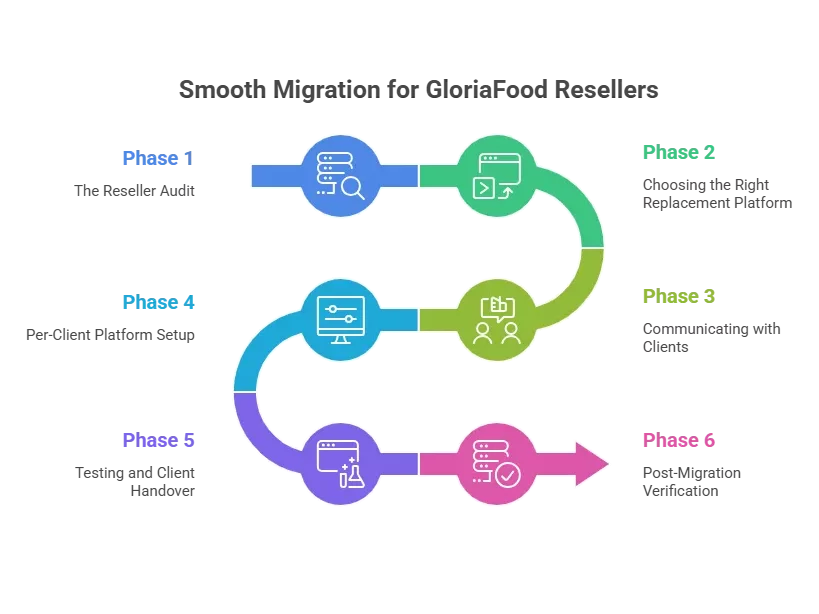
Migrating one restaurant might take a weekend. Migrating an entire client portfolio takes 7-8 weeks of focused work. The full GloriaFood migration checklist for partners is built around this six-phase timeline:
| Phase | Duration | Key Activities | Risk Level |
| 1. Reseller Audit | Week 1 | Inventory all clients, access, and current setup | Low |
| 2. Platform Decision | Week 1-2 | Evaluate replacement options at the reseller level | High |
| 3. Client Communication | Week 2 | Notify clients, set expectations, get sign-off | Medium |
| 4. Per-Client Setup | Week 2-6 | Migrate each client onto the new platform | High |
| 5. Testing & Handover | Week 5-7 | Test per client, train staff, go live | Critical |
| 6. Post-Migration | Week 7-8+ | Monitor, verify, and wind down GloriaFood accounts | Medium |
If you are managing more than 20 clients, stretch the per-client setup phase. Quality matters more than speed. One messy launch can hurt your reputation more than a delay.
6 Phases Migration Checklist For GloriaFood Resellers For Smooth Migration
Phase 1: The Reseller Audit
Before you talk to any restaurant or pick a new platform, get a complete picture of every client you manage. Most reseller migration mistakes happen because someone starts moving Client A without realizing Client B has a custom integration that will break the same way. Map everything first.
Inventory Every Client Account
Start by listing every restaurant you have ever onboarded to GloriaFood. For each one, capture:
- The GloriaFood login credentials and which account they sit under
- Whether you or the restaurant owns the account
- Which clients are on paid add-ons versus the free tier
- The billing cycle end date for each paid client
- Lapsed, churned, or silent clients (some may still want migration help)
- Clients with custom domain setups pointing to GloriaFood
- Clients using GloriaFood’s branded mobile app add-on
This list becomes the master tracking sheet for the rest of the migration.
Document Your White-Label Setup
Take screenshots of your reseller dashboard and note how white-label branding is applied across client accounts. List every shared asset (logos, brand colors, email templates), your current pricing model (monthly retainer, setup fees, transaction cuts), and every integration you set up on behalf of clients, POS, dispatch, email, analytics. Also note any custom code, CSS, or embed configurations you deployed for clients.
If your GloriaFood setup was built once and replicated across clients, your migration can be templated the same way. One strong setup on the new platform becomes the base for every client migration.
Export All Client Data Now
Don’t assume you can come back for the data later. Treat the export window as closing today. Even for clients who haven’t confirmed migration yet, pull their data now.
For every client, export:
- Menu data (categories, items, modifiers, prices, images)
- Customer database (only opted-in customers)
- Order history (at least 12 months)
- Delivery zone configurations
- Promotion and discount codes
- Business hours, holiday hours, service settings
- Notification templates
- All menu item images at full resolution
Capture Baseline Metrics
You need a “before” snapshot to compare against post-migration performance. Record each client’s monthly order volume, average order value (AOV), peak ordering hours, top 10 selling items, and any client with high customer retention or strong loyalty usage. These numbers will tell you which migrations actually went well and which ones quietly underperformed.
Phase 2: Choosing the Right Replacement Platform
This is the biggest decision in the entire GloriaFood partners migration checklist. You are not choosing a platform for one location, you are choosing infrastructure that affects every client you manage. A wrong call here is expensive.
Define Your Reseller Requirements
Before evaluating platforms, write down what you actually need:
- White-label branding (your brand, not the platform’s)
- A multi-tenant dashboard to manage all clients from one login
- Must-have features (menu modifier depth, delivery zones, loyalty, reservations)
- Partner or agency pricing tier
- Cost structure that works for you (monthly SaaS, revenue share, or one-time)
- Branded mobile apps for clients who need them
- POS integrations required across your client base
Top Platform Alternatives to Evaluate
The most common Gloriafood reseller/partner alternatives:
- UpMenu: around $89/month per client, white-label option, agency partner program
- Restolabs: $45-$69/month, multi-location support, partner dashboard
- Flipdish: €49-€129/month per client, white-label, 12-month contract
- ChowNow: $149/month, US-focused, partner referral program
- GloriaFood Clone: $4,000-$12,000 one-time, you own and resell the entire platform
- Custom-built ordering platform: higher upfront cost, full control, ideal for scale
If you manage 10 or more restaurants, do the math over 3-5 years. A GloriaFood Clone or custom-built platform almost always costs less than paying monthly SaaS fees per client. The clone option also gives you the same white-label control you had with GloriaFood, you remain the platform, not just a reseller of someone else’s platform.
The GloriaFood Clone Option
A GloriaFood Clone is a self-hosted, white-label ordering platform built to replicate GloriaFood’s feature set. For resellers, the appeal is straightforward:
- You own the platform, no monthly per-client fees, no vendor lock-in
- You control the brand, your logo, your domain, your customer relationship
- You set your own pricing for each client
- You are not exposed to another SaaS vendor shutting down or changing terms
- You decide the feature roadmap
Build Your Own Ordering Platform
Turn the GloriaFood shutdown into an upgrade. We use our battle-tested core to accelerate your platform development, plan the rollout, and keep every restaurant client on your side.
Before going this route, work through the practical questions:
- Do you have a developer who can manage the self-hosted infrastructure?
- Is hosting handled (VPS, cloud provider) or do you need managed hosting included?
- Does the clone vendor offer setup support or is it fully DIY?
- What does post-purchase support and bug fixing look like?
- Does the clone support the same add-ons your clients currently use?
Demo, Negotiate, and Decide
Schedule demos with your top three platform candidates. For each one:
- Ask specifically about their reseller or agency program
- Confirm whether white-label branding is included or a paid add-on
- Ask about bulk pricing for onboarding multiple clients
- Get migration support commitments in writing
- Confirm contract length and early termination terms
- Get the all-in cost per client in writing (setup, monthly, transaction fees)
- Verify data portability, what happens to client data if you leave the platform?
Sign the contract only when you have a clear onboarding timeline.
Phase 3: Communicating with Clients
Your clients are restaurant owners, not tech operators. Most of them don’t know GloriaFood is shutting down until you tell them. How you handle this conversation decides whether they trust you through the migration or start looking for someone else.
What the First Client Email Should Cover
Keep it clear and calm. Avoid alarming language. Your email should:
- Explain that GloriaFood is being retired on April 30, 2027
- Frame the migration as an upgrade you are managing on their behalf
- Name the new platform and explain why you chose it
- Summarize what changes and what stays the same in plain language
- Set a target go-live date for their migration
- Include your direct contact for questions
Frame this as proactive service, not crisis management. “We are upgrading your ordering platform before the April deadline” sounds very different from “Your platform is shutting down.” Clients who feel looked after stay clients.
Getting Sign-Off and Triaging Urgency
Get written confirmation (email is fine) from each client to proceed. Confirm any customizations they want preserved or changed. Some clients will use the migration as a chance to refresh their menu, that’s normal. Confirm the right contact at each restaurant for testing and training, and pick a go-live window that avoids their peak days.
Then prioritize. High-volume clients go first because they have the most to lose. Flag clients whose paid GloriaFood add-ons expire soonest. Flag the technically challenged clients for extra hand-holding. Build a migration calendar and assign every client a target go-live date.
Phase 4: Per-Client Platform Setup
This is the heaviest phase. Use a templated setup process so every client migration follows the same steps. Make Client 12 as clean as Client 1.
Account and Branding Setup
For each client, create their account, set up their business profile (name, address, phone, hours), upload their logo at the right resolution, set their brand colors to match their old GloriaFood look, write the business description, and upload cover photos and gallery images from the data export.
Rebuilding Each Menu
Menu accuracy is where most clients judge the migration. Recreate categories in the same order as their GloriaFood setup. Add every item with name, description, and price. Upload menu images, set up modifier groups (size, toppings, sides), configure modifier pricing, set up combos and bundles, configure specials, add allergen tags, and set time restrictions on items where needed. Verify all prices match the exported GloriaFood data exactly.
The single most common complaint after launch is missing items. Print the GloriaFood menu export and tick off each item as you add it. Have a second person do a final count.
Operations, Payments, and Integrations
Set business hours, holiday hours, and separate service hours for delivery and pickup. Set order prep times. Recreate delivery zones exactly as they were in GloriaFood and set fees by zone. Configure minimum order amounts, tax rates, tip options, scheduled ordering, and table or QR ordering if used.
For payments, connect the client’s processor (Stripe, Square), confirm the account is verified, run a real $1 test transaction, confirm refunds work, verify the payout bank account, and set refund permissions for their team.
For integrations, connect the POS, set up the kitchen display or printer, reconnect dispatch tools (Shipday, Tookan), connect SMS/email notifications, set up Google Analytics, configure Facebook Pixel if they run ads, and reconnect review platforms (Google, Yelp, TripAdvisor).
Customer and Marketing Setup
Import the customer database from the GloriaFood export and verify email subscription preferences are preserved. Recreate active promo codes, set up the loyalty program, migrate existing loyalty point balances or issue equivalent credit. Configure order confirmation and receipt templates, then set up automated marketing flows (welcome series, abandoned cart, etc.).
Phase 5: Testing and Client Handover
A bug at launch will cost you the client relationship. Test every setup before going live.
End-to-End Testing
For each client, run through the full customer journey:
- Place a complete pickup order
- Place a complete delivery order
- Place a scheduled/future order
- Test on Chrome, Safari, and Firefox desktop
- Test on iPhone Safari and Android Chrome
- Test credit card checkout
- Test Apple Pay or Google Pay if configured
- Verify confirmation emails reach the customer
- Verify order notifications reach the kitchen
- Test the refund process
- Test out-of-stock handling
- Test promo code application
- Test delivery zone enforcement (try ordering from outside the zone)
- Verify business hours blocking (orders outside hours should fail)
Website and External Link Updates
The website and external links carry orders to the new platform. Replace the GloriaFood ordering widget on the client’s website, update every “Order Online” button, update the menu page link, set up 301 redirects from old GloriaFood URLs to new ones, test the new widget loads correctly, and update any WordPress, Wix, or Squarespace plugins. Update SEO metadata if the ordering URL changed.
External links matter just as much. Update the order button on Facebook, the Instagram bio link, Google Business Profile order link, TripAdvisor, Yelp, local directories, and replace QR codes on physical menus, table tents, and receipts.
Staff Training
Schedule a hands-on session with kitchen and front-of-house staff. Train at least one manager as the system administrator. Walk staff through the new order flow, train them on marking items out of stock in real time, train them on processing refunds, and provide a one-page quick reference. Have staff complete five test orders before going live.
If you are migrating many clients at once, build a standard training deck and record a short video walkthrough. Staff can watch on demand and you scale your training without scaling your time.
Go-Live Execution
Confirm staff are trained and aware of the date. Confirm the new platform’s support team is on standby. Process pending GloriaFood orders before cutover. Activate the new ordering widget at the planned time. Test a live order and confirm the kitchen receives it. Monitor the first 10 orders closely. Check payment processing. Have a dedicated contact ready for the client during their first shift on the new system.
Always go live on a Tuesday or Wednesday morning. Lower order volume, more support available, and you have the rest of the week to fix anything.
Phase 6: Post-Migration Verification
The first two weeks after going live are a soft launch in practice. Stay close to each client.
Per-Client Monitoring in the First Two Weeks
Check daily order volume against the pre-migration baseline. Watch for unexpected drops in average order value. Review customer complaints and support tickets daily. Check for failed payment transactions. Verify the kitchen is receiving 100% of orders. Confirm email and SMS notifications are being delivered.
Reseller-Level Reporting
Pull a weekly rollup across all migrated clients. Compare aggregate order volume to baseline. Identify underperforming clients and investigate. Survey restaurant managers about the new platform. Document any recurring issues that hit multiple clients, that usually points to a platform bug or a configuration mistake in your template.
Winding Down GloriaFood Accounts
For each client, confirm the GloriaFood account is in archive or read-only mode. Cancel all paid GloriaFood add-ons. Verify final billing is processed and no recurring charges remain. Download one final backup of GloriaFood data for archive. Inform the client’s accountant about the platform change for expense records. Mark April 30, 2027 on your calendar as the final shutdown.
Improving Your Process for Next Time
Identify the top three friction points from client feedback. Update your standard onboarding template to fix those for future clients. Document your migration playbook now while it is fresh, you will use this again. Review your new per-client cost structure and update your pricing if needed. And honestly assess whether the clone or custom platform option now makes more sense for long-term stability.
Build Your Own Ordering Platform
Turn the GloriaFood shutdown into an upgrade. We use our battle-tested core to accelerate your platform development, plan the rollout, and keep every restaurant client on your side.
Common GloriaFood Migration Mistakes to Avoid
| Mistake | What to Do Instead |
| Migrating clients one by one without a template | Build the setup and migration process once. Every client after the first should be faster. |
| Picking a per-client SaaS without doing the math | If you have 10+ clients, calculate 3-5 year total cost. The Clone often wins. |
| Not pulling client data early enough | Export everything in Week 1, even for clients who haven’t confirmed yet. |
| Telling clients too late | Give 6-8 weeks of notice minimum. Last-minute clients are the hardest to manage. |
| Going live on a Friday or weekend | Always cut over Tuesday or Wednesday morning. |
| Forgetting external link updates | Google Business, Facebook, Instagram, Yelp, and printed QR codes all need updating. |
| Treating staff training as the restaurant’s problem | A 30-minute walkthrough prevents 3 weeks of support tickets. |
| Skipping 301 redirects | Customer bookmarks and email links go nowhere without redirects. |
Final Thoughts for Resellers
The GloriaFood shutdown is a forcing function, but it is also an opportunity. Every restaurant on your client list has to move. The resellers who handle this migration proactively, cleanly, and without drama will keep their entire client base. The ones who handle it reactively will lose clients to whoever steps in first.
There is also a bigger question this moment forces you to answer: do you want to keep renting a platform from a third-party vendor, or do you want to own your infrastructure? The GloriaFood Clone and custom-built options exist for exactly this reason. You remain the platform, not just a reseller of someone else’s platform that can shut down again.
Use this GloriaFood migration checklist for resellers as your working document. Tick off each phase as you complete it. Don’t let April 30, 2027 catch you or your clients unprepared.
FAQs
How long does it take to migrate all my clients off GloriaFood?
For most resellers, the full migration takes 7-8 weeks of focused work across six phases, audit, platform decision, client communication, per-client setup, testing, and post-migration verification. If you manage more than 20 clients, plan for 10-12 weeks. The April 30, 2027 deadline gives you enough runway, but only if you start now.
What is the first thing resellers should do when starting a GloriaFood migration?
Start with a full audit of your client base before doing anything else. Inventory every restaurant you onboarded, document your white-label setup, and export all client data, menus, customer databases, order history, delivery zones, even for clients who haven’t confirmed migration yet. Data access disappears once accounts are closed, so treat the export window as closing today.
How do I tell my restaurant clients that GloriaFood is shutting down?
Frame the conversation as proactive service, not crisis management. Send a clear, calm email explaining that you are upgrading their ordering platform before the April 2027 deadline, name the replacement platform you’ve chosen, summarize what changes and what stays the same, and offer a target go-live date. Clients who feel looked after stay clients.
Which platform should I migrate my GloriaFood clients to?
The right platform depends on your client count and business model. For 10+ clients, a GloriaFood clone or custom-built platform almost always wins on 3-5 year total cost and gives you full white-label control. For smaller portfolios or quicker migrations, SaaS options like UpMenu, Restolabs, Flipdish, ChowNow, and Deonde all offer reseller programs worth evaluating against your specific feature needs.
What is the most common mistake resellers make during GloriaFood migration?
Migrating clients one by one without a template is the most expensive mistake. Build your setup process once on the new platform, document it as a repeatable playbook, and every client migration after the first should be faster. Other common mistakes include exporting client data too late, going live on a Friday or weekend, forgetting to update Google Business and social media links, and skipping 301 redirects from old GloriaFood URLs.
What should resellers do after the migration goes live?
Treat the first two weeks as a soft launch. Monitor each client’s daily order volume against pre-migration baselines, check for failed payments, verify the kitchen is receiving 100% of orders, and watch customer complaints closely. At the reseller level, pull a weekly rollup across all migrated clients to spot configuration issues affecting multiple restaurants. Then archive each GloriaFood account, cancel paid add-ons, and document your playbook while it is fresh.
Contact Us
Choose from our highly qualified talent pool!

11+ years of Experience

62+ Countries

320+ Customers
